Affiliate Disclosure: As an Amazon Associate, Portable Power Lab earns from qualifying purchases at no extra cost to you.
Last Updated: April 2026 | Reading time: ~12 minutes
You’re about to spend $400, $800, maybe $1,500 on a portable power station. The question you should ask before clicking buy: how long will this thing actually last?
Not “what’s the warranty?” The warranty tells you what the company replaces for free. The lifespan tells you how long the product actually works — and whether you’re buying something that lasts 18 months or 11 years.
Here’s what most lifespan guides miss: a portable power station has two distinct longevity systems — the battery (chemical lifespan) and the electronics (mechanical lifespan). Understanding both is essential to setting realistic expectations and getting the most out of your investment.
🔋 Battery Storage Decay Visualizer
See exactly how much charge your power station retains over time — by chemistry type and storage conditions.
Part 1: Battery (Chemical) Lifespan — The Cycle Count Reality
How Battery Lifespan Is Measured
A “charge cycle” is one complete discharge-and-recharge sequence. Using your power station from 100% to 0% and back to 100% is one full cycle. Using it from 100% to 50% twice is also one full cycle.
Manufacturers rate batteries as “X cycles to 80% capacity” — meaning the battery retains at least 80% of its original storage after X complete cycles. After that threshold, the battery continues working with progressively diminishing capacity.
Lifespan by Brand and Model
| Power Station | Chemistry | Rated Cycles | Daily Use | Weekly (3×) | Emergency (1×/month) |
|---|---|---|---|---|---|
| Jackery Explorer 1000 Plus | LiFePO4 | 4,000 | 11 years | 26 years | 333 years |
| EcoFlow Delta 2 | LiFePO4 | 3,000 | 8.2 years | 19 years | 250 years |
| Anker Solix C1000 | LiFePO4 | 3,000 | 8.2 years | 19 years | 250 years |
| Bluetti AC180 | LiFePO4 | 2,500 | 6.8 years | 16 years | 208 years |
| Goal Zero Yeti 500X | NMC | 500 | 1.4 years | 3.2 years | 41 years |
| Budget NMC units | NMC | 500 | 1.4 years | 3.2 years | 41 years |
The emergency-use insight: If you buy a power station purely for outage emergencies and charge it monthly, even an NMC unit lasts 41 years before degrading. For emergency-only use, chemistry matters far less than for regular use.
The daily-use reality: If you’re using a power station regularly — camping weekly, home backup during frequent outages, daily job site use — LiFePO4 at 3,000–4,000 cycles is the only responsible purchase. NMC at 1.4 years daily is a recurring expense, not a one-time purchase.
The chemistry that determines lifespan — LiFePO4 vs NMC explained
The 5 Things That Kill Batteries Early
1. Storing at 100% Charge
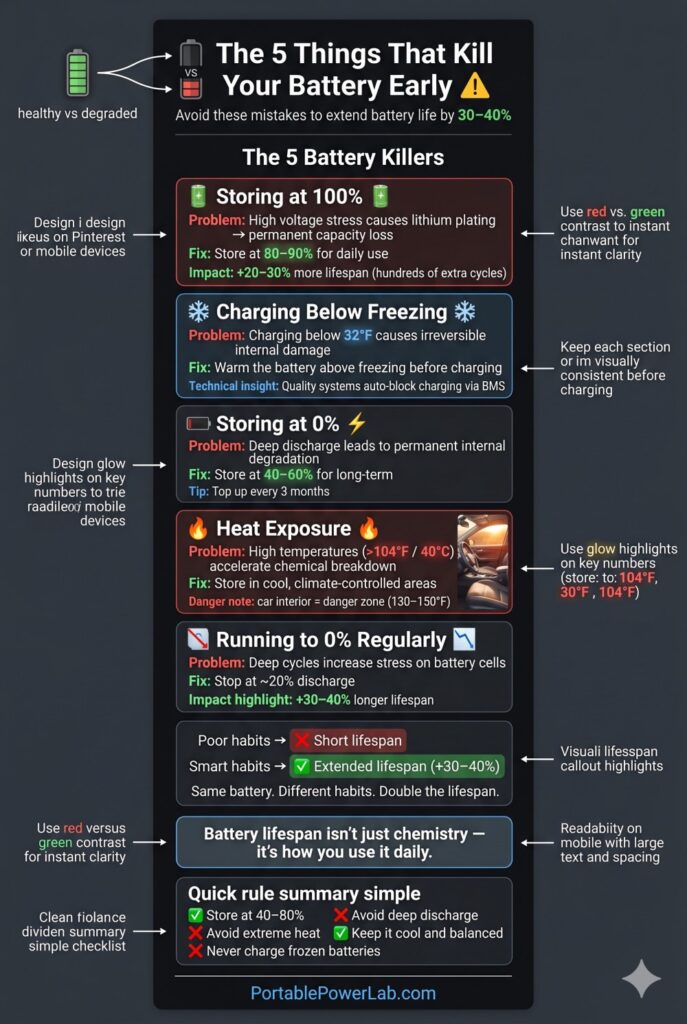
Lithium batteries experience accelerated degradation at maximum charge state for extended periods. The chemical stress on cells at peak voltage causes microscopic lithium plating that permanently reduces capacity.
The fix: Set maximum charge limit to 80–90% in the app for day-to-day storage. Reserve 100% for camping trips or outages.
Lifespan extension: Storing at 80% instead of 100% can add 20–30% more cycles — approximately 600–1,200 additional cycles on a 3,000-cycle unit.
2. Charging Below Freezing
Charging LiFePO4 batteries below 32°F (0°C) causes lithium plating on the anode — permanent cell damage that reduces capacity and creates internal short circuit risk over time.
The fix: Most quality units (EcoFlow, Jackery, Bluetti) have BMS systems that automatically pause charging when battery temperature is below freezing. Let the battery warm above 32°F before charging in cold environments.
3. Storing at 0% Charge
Storing at 0% for extended periods causes irreversible copper dissolution in the anode — a permanent, cumulative capacity loss.
The fix: Never store depleted. For long-term storage (months), charge to 40–60%. Check and top off every 3 months.
4. Heat Exposure Above 104°F
Sustained temperatures above 104°F (40°C) accelerate chemical degradation in all lithium chemistries. Parked car interiors in summer routinely reach 130–150°F.
The fix: Store in climate-controlled spaces. Never leave in a hot car trunk for extended periods.
5. Consistently Running to 0%
Regularly depleting to 0% (even with BMS floor protection) stresses the cells more than stopping at 20%. The last 20% of discharge involves higher electrical stress.
The fix: Set a discharge limit of 20% in the app. Your 1,000Wh unit becomes functionally an 800Wh unit — but lasts 30–40% longer.
How to set charge limits in the EcoFlow app
The Battery Preservation Protocol: Add 3 Years to Any Unit
| Practice | App Setting | Lifespan Impact |
|---|---|---|
| Maximum charge limit | 80–90% | +20–30% more cycles |
| Minimum discharge limit | 20% | +15–25% more cycles |
| Storage charge level | 40–60% | Prevents degradation during storage |
| Storage temperature | 60–77°F (15–25°C) | Minimal thermal degradation |
| No charging below 32°F | Never override BMS | Prevents permanent lithium plating |
Combined effect on an EcoFlow Delta 2 (3,000 rated cycles): Following this protocol can extend effective life to 4,000–4,500 equivalent cycles — adding approximately 3 years of daily-use lifespan at zero additional cost.
Part 2: Inverter & Electronics (Mechanical) Lifespan — The Conversation Nobody Has
Here’s the section that the vast majority of power station guides entirely skip — and it’s genuinely important for setting long-term expectations.
The key truth: Your LiFePO4 battery might be rated for 3,000–4,000 cycles and last 8–11 years. But a portable power station also contains electronic components with their own independent lifespans — specifically, the inverter, capacitors, fan, and cooling systems. These mechanical and electronic parts have failure modes completely separate from battery chemistry.
🔧 What Fails First? The Predictive Failure Guide for Long-Term Owners
After 5–8 years of daily use, your power station will begin showing wear. Understanding what typically fails first — and in what sequence — helps you plan, budget, and decide when to repair vs. replace.
Based on the engineering principles outlined in this guide, here is the typical failure sequence for a LiFePO4 power station in daily home backup use:
The Failure Timeline (Daily Use, LiFePO4 Unit)
Year 1–3: The Honeymoon Period No meaningful degradation. The unit operates at spec. BMS balances cells perfectly. Fan runs occasionally and quietly. This is what “new” feels like.
Year 3–5: Early Mechanical Wear
- Cooling fan bearing wear begins — fan may be 3–5 dB louder at high loads
- Display screen pixels — minor brightness reduction possible
- Port spring tension — AC outlets may have slightly less tension, still functional
- Battery: Minimal capacity loss (LiFePO4 at 1,000 cycles has lost only ~3–5% of original capacity)
Year 5–7: Mid-Life Degradation
- Fan noise increases notably — may develop occasional irregular sounds at high loads
- Electrolytic capacitors begin subtle degradation — may manifest as slight output voltage ripple (usually imperceptible)
- Handle hardware — minor looseness in hinges, still functional
- Battery: ~85–90% capacity at 2,000 cycles — still highly functional
Year 7–10: End-of-Life Indicators
- Fan may need replacement — bearings worn; should be serviced if audible grinding or rattling
- Capacitor degradation may affect performance — occasional instability under maximum load (brief trips followed by recovery)
- Battery capacity — approaches 80% of original (the rated-cycle threshold) around year 8–11 depending on use
Year 10+: Decision Point At this stage, you face one of three paths:
- Continue use at reduced capacity — the unit still works; just with less runtime
- Manufacturer service — fan replacement, capacitor replacement if available
- Replace — and recycle the old unit through Call2Recycle or your manufacturer’s takeback program
Component Failure by Type
| Component | Failure Mode | When? | Can You Fix It? | Cost |
|---|---|---|---|---|
| Cooling fan | Bearing wear, dust buildup | Year 3–7 | ✅ Often replaceable | $15–$50 part; manufacturer service |
| Electrolytic capacitors | Electrolyte drying | Year 5–12 | ✅ Theoretically yes | Requires electronics skill or service |
| LCD display | Pixel failure, brightness loss | Year 5–10 | ❌ Usually not DIY | Manufacturer service or replacement |
| Port contacts | Oxidation, spring fatigue | Year 3–8 | ✅ Cleaning with contact cleaner | DIY ($10 contact cleaner) |
| BMS electronics | Thermal aging | Year 10+ | ❌ Generally not serviceable | Replacement |
| LiFePO4 battery cells | Capacity fade | Year 8–11 (daily) | ❌ Not user-replaceable | Manufacturer replacement program |
The “Canary” Symptoms: Early Warning Signs
Watch for these before component failure becomes catastrophic:
- Fan runs louder than usual at loads that previously didn’t engage it → bearing wear beginning
- Unit feels warmer than normal under loads it previously handled cool → cooling efficiency declining
- BMS trips at loads previously handled smoothly → possible capacitor stress or battery degradation
- App shows declining “State of Health” percentage → battery degradation trackable via app on EcoFlow and Bluetti units
- AC outlet voltage measures below 118V (check with a simple outlet tester) → inverter calibration drift
The Fan Maintenance Protocol (Extends Life by Years)
The single most effective maintenance action for a power station: compressed air cleaning every 12–18 months.
- Turn off the unit and unplug all connections
- Use a can of compressed air
- Blow air through all ventilation slots — front, sides, and bottom
- Allow 10 minutes before powering on (static dissipation)
- Run the unit at moderate load for 15 minutes and observe fan behavior
Dust accumulation on fan blades increases their effective weight, accelerating bearing wear and reducing airflow. This one 10-minute procedure can extend fan life by 2–3 years.
Understanding the Electronics Stack
A portable power station contains:
| Component | Function | Primary Failure Mode | Typical Lifespan |
|---|---|---|---|
| MOSFET transistors | Control power switching | Thermal stress from overloading | 10,000–100,000 hours rated |
| Electrolytic capacitors | Smooth voltage, filter noise | Electrolyte drying (heat-accelerated) | 5–15 years at rated temp |
| Cooling fan(s) | Maintain operating temperature | Bearing wear, dust accumulation | 3–7 years continuous; longer intermittent |
| BMS electronics | Protect and balance battery | Component aging | 10+ years under normal use |
| MPPT charge controller | Optimize solar input | Thermal cycling stress | 10–15 years typically |
| AC-DC transformer | Convert voltage | Insulation degradation | 10–20 years typically |
Capacitor Lifespan: The Silent Degradation Risk
Electrolytic capacitors are the most life-limited electronic component in most power station inverters. Their electrolyte — a conductive liquid — gradually evaporates over time and with heat exposure.
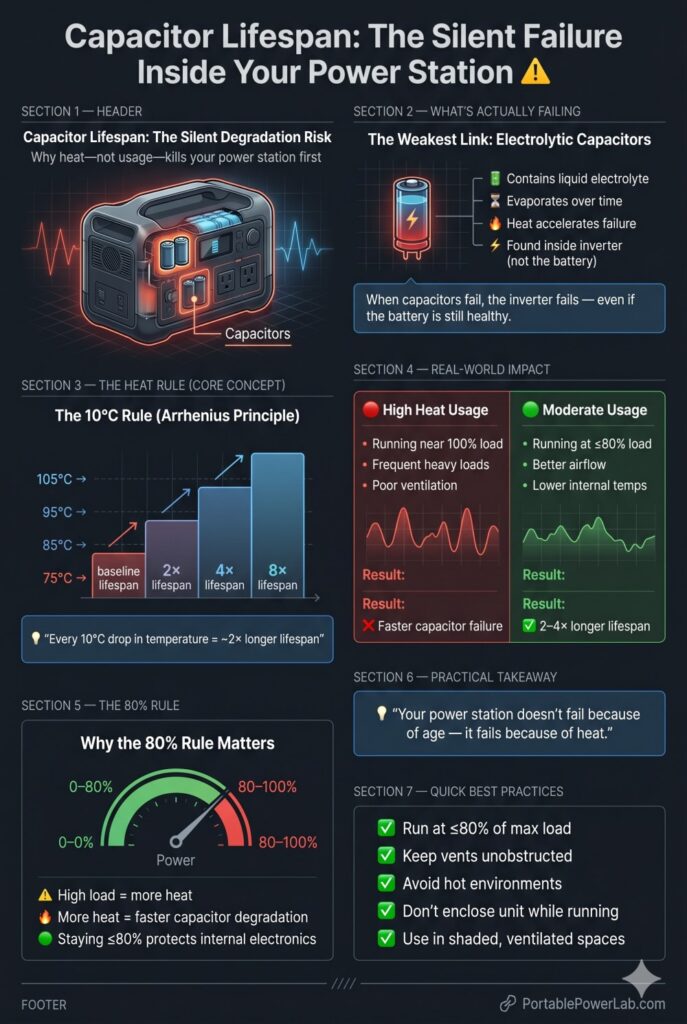
The heat relationship is critical: Capacitor lifespan approximately doubles with every 10°C reduction in operating temperature, following the Arrhenius equation used in electronics reliability engineering.
- A capacitor rated at 105°C that operates at 85°C will last roughly 4× longer than at its rated temperature
- A unit that runs hot (near maximum load frequently) stresses capacitors more than one used at moderate loads
- This is why the “80% load rule” (don’t run your inverter above 80% of its continuous rating) extends electronic component life, not just battery life
Practical implication: A power station that spent 8 years running at 90% of inverter capacity will have older-feeling electronics than one that spent 8 years running at 40% capacity — even if both batteries are at the same cycle count.
Cooling Fan Longevity: The Maintenance Item Nobody Mentions
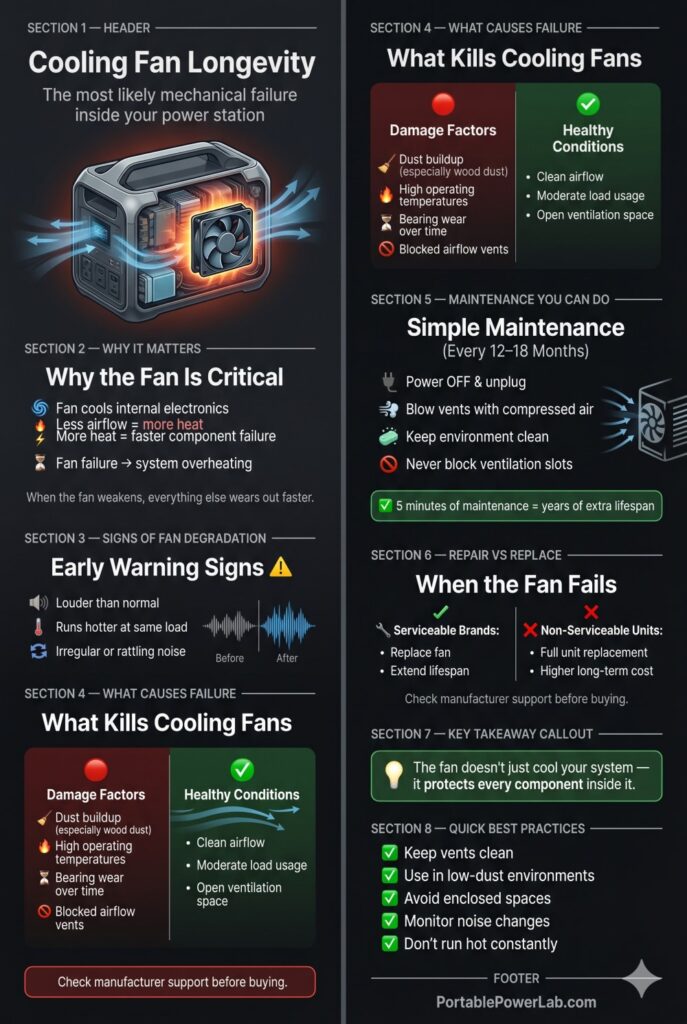
The cooling fan is the single most likely mechanical failure point in a portable power station. Fan bearings wear over years of operation, and dust accumulation inside the unit reduces cooling efficiency — increasing thermal stress on every other component.
Signs of fan degradation:
- Noticeably louder fan noise than when new
- Higher operating temperatures under comparable loads
- Fan noise that’s irregular or includes rattling
Fan maintenance you can actually do:
- Use compressed air to blow out vents every 12–18 months (with the unit off and unplugged)
- Keep the unit in clean environments — wood shop dust is particularly harmful
- Don’t block the ventilation slots during operation
When fan replacement is warranted: Some manufacturers (particularly EcoFlow) sell replacement fan components and offer service programs. Others treat the unit as non-serviceable. Check your brand’s service policy before assuming a fan failure means total unit replacement.
Chemical vs. Mechanical Lifespan: Setting Realistic Expectations
| Component | Expected Lifespan | Primary Limiter |
|---|---|---|
| LiFePO4 battery (4,000 cycle) | 8–11 years daily use | Cycle count and temperature |
| LiFePO4 battery (3,000 cycle) | 6–8 years daily use | Cycle count and temperature |
| NMC battery | 1.4–2.7 years daily use | Cycle count |
| Cooling fan | 3–10 years | Bearing wear, dust |
| Electrolytic capacitors | 5–15 years | Heat, operating temperature |
| MOSFET/control electronics | 10–20 years | Heat, surge events |
| Overall unit (daily use) | 5–8 years realistic for most users | Usually fan/cap before battery |
| Overall unit (weekly use) | 10–15 years realistic | Battery often outlasts electronics |
The honest summary: For daily-use scenarios, the cooling fan and capacitors often become the limiting factor before the battery reaches its rated cycle count. For weekly/monthly users, the battery chemistry is typically the primary long-term limiter, and LiFePO4 units often outlast their mechanical components with proper care.
What “Manufacturer Service” Looks Like
- EcoFlow: Offers a paid repair program; some components serviceable by authorized centers
- Jackery: 3-year warranty, repair or replacement program; limited DIY serviceability
- Bluetti: 2-year standard (5-year with registration); active spare parts and service center network
- Goal Zero: 2-year warranty; repair-oriented service program for higher-end units
At the end of a unit’s service life, responsible disposal means using the manufacturer’s takeback program or a certified lithium battery recycler — never standard household trash.
Practical Lifespan Summary by Use Case
| Use Case | Charge Frequency | LiFePO4 Battery Life | Electronics Life | Practical Unit Life |
|---|---|---|---|---|
| Daily home backup | Daily | 8–11 years | 5–10 years | 5–8 years |
| Regular camping | 3×/week | 19–26 years | 7–12 years | 7–12 years |
| Occasional use | Weekly | 57+ years | 10–15 years | 10–15 years |
| Emergency only | Monthly | 250+ years | 15–20 years | 15–20 years |
When It’s Time to Replace
Your power station doesn’t fail suddenly — it fades:
- Battery percentage hits 0% significantly faster than when new (capacity loss)
- App-reported maximum capacity has dropped below 70% of original rating
- Fan noise is substantially louder or irregular
- Unit runs hot under loads it previously handled without the fan engaging
- BMS trips overload protection at loads significantly below the rated maximum
See the top-rated LiFePO4 stations at every price point
How long does a portable power station last with daily use?
For LiFePO4 units: 5–8 years in practice (electronics often the limiting factor before battery). For NMC units: 1.4–2.7 years to battery degradation. LiFePO4 is the clear choice for regular use.
Does the inverter wear out before the battery?
Potentially, yes — particularly in units used at high load daily. Cooling fans (3–10 year bearing life) and electrolytic capacitors (5–15 year lifespan) can degrade before a 4,000-cycle LiFePO4 battery reaches its rated limit. Running units at moderate loads (under 80% of inverter rating) extends electronic component life significantly.
Can I replace the battery or inverter myself?
Generally not. Consumer portable power stations are not designed for user-serviceable battery replacement. Some manufacturers offer service programs. When components fail, most users replace the unit and recycle the old one through a certified lithium battery recycler.